Loudness Analysis
PlayIt Live can analyse your tracks, calculate an offset gain, and store this for each track in your database. When a track is played, this gain will be applied. This ensures each track has the same loudness when played.
The ITU-R BS.1770 algorithm is used to measure loudness. This is commonly known as LUFS normalisation.
To open Loudness Analysis, go to Tools > Loudness Analysis.
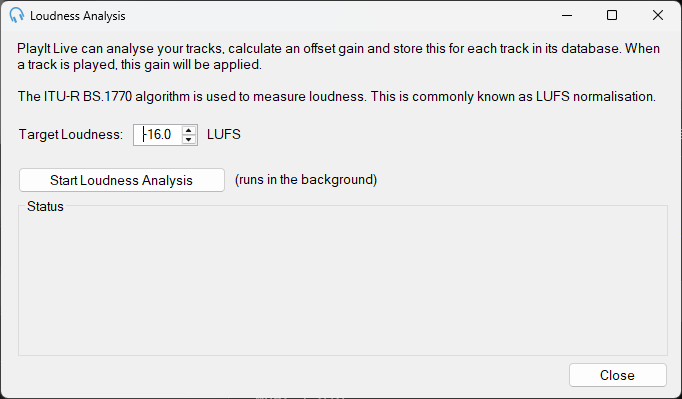
To begin Loudness Analysis, select a Target Loudness (default -16 LUFS) and click Start Loudness Analysis.
PlayIt Live will run Loudness Analysis in the background as it processes each track. Due to the complexity of the algorithm, it can take several hours to process all the tracks. This only needs to be done once. Leave PlayIt Live running so it is able to process the tracks in the background. Any new tracks that are added will be automatically processed in the background.
When the results are not quite right
Loudness Analysis works well for most music, but it is not perfect. Tracks with a wide or varying range of levels - for example a quiet spoken intro that builds into a loud chorus, or material with a large dynamic range - can be measured in a way that makes them sound too loud or too quiet next to everything else. It is worth spot-checking the results and adjusting any tracks that stand out.
Overriding a single track's gain
The gain that Loudness Analysis calculates is stored in each track's Gain value, which you can change by hand. Open the track in the Edit Track window and adjust the Gain field (in decibels): positive values make the track louder, negative values make it quieter. Your value replaces the analysed one for that track.
Resetting the analysed values
If you are not happy with the results and want to start again, you can clear the gain across many tracks at once:
- Open Manage Tracks and select the tracks to reset (press Ctrl+A to select all).
- Click Edit to open the Bulk Edit dialog.
- Tick the Gain checkbox and set the value to blank.
- Click Save Tracks.
This resets the gain on every selected track. You can then run Loudness Analysis again - with a different Target Loudness if you wish - to re-analyse from scratch.