Edit Hook Sequence Settings Window
The Edit Hook Sequence Settings window is used to configure a hook sequence clock item. Hook sequences are special items that can play a series of short clips of songs known as hooks back-to-back. This is typically used to promote current types of songs on your station, or songs that will be playing in the next 15-60 minutes. This window is launched from the Edit Clock window.
A 3-song hook sequence will be of the following form:
In Track
A station identifier or audio such as "Coming Up" that opens the sequence.
Song 1 Hook
A short snippet of the song. The Hook Start and Hook End defined on the track is used for the best hook selection. If no Hook Start or Hook End is defined, a hook starting at 20% into the track will be used.
Transition Track
A short sweeping track to link Song 1 hook and Song 2 hook together.
Song 2 Hook
A short snippet of the second song.
Transition Track
A short sweeping track to link Song 2 hook and Song 3 hook together.
Song 3 Hook
A short snippet of the third song.
Out Track
The final element to play, typically another station identifier or audio such as "Stay Tuned".
The target duration is used to determine the length of the hook sequence. If the duration of the hooks is too short or too long, their durations will be adjusted proportionally to meet the target duration.
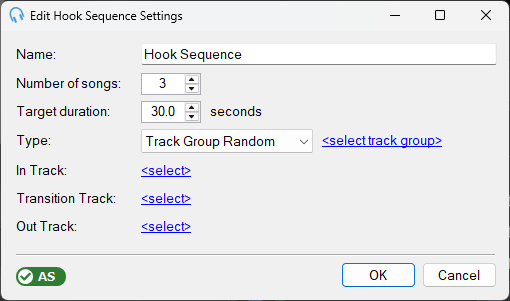
Name

The name of the hook sequence.
Number of Songs

The number of songs in the hook sequence. Only tracks with the type 'Song' will be considered.
Target Duration

The target duration of the hook sequence in seconds.
Type

There are 4 types of hook sequence:
Track Group Random: plays hooks from unique random songs selected from the chosen track group.
Coming Up: plays hooks from songs scheduled to play in the near future. When using the minutes option, hooks are selected from songs scheduled within the specified time period. When using the songs option, hooks are selected from the next X songs in the playout log.
Coming Up (Reversed): the same as Coming Up, but the hooks play in reverse order (last song first).
Coming Up (Random): the same as Coming Up, but the hooks are played in a random order rather than in schedule order.
Hook Elements

The hook elements are used at the start, between hooks, and at the end of the hook sequence. Each element can be a specific track or a random track from a specific track group. Typically hook elements are only a few seconds long.
Advanced Scheduling Indicator

The AS indicator shows whether the Advanced Scheduling module has been licensed. It is required to use hook sequences. If the indicator is shown in red, click it to purchase or start a free trial of the module.
OK Button

Click OK to save the settings and close the window.
Cancel Button

Click Cancel to discard changes and close the window.