QuickCart Pages
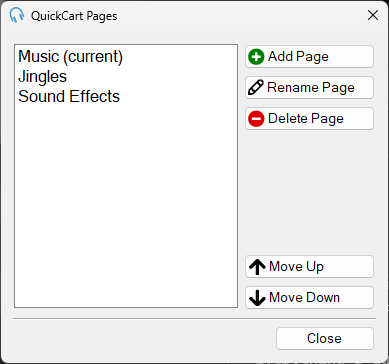
The QuickCart Pages window is used to manage the pages in the QuickCarts panel or window. All changes are applied immediately.
1
Page list

The page list shows all pages in order. Select a page to rename it, delete it, or change its position. Double-click a page to make it the current page and navigate to it in the main window.
2
Add Page

Click Add Page to add a new page to the bottom of the list.
3
Rename Page

Click Rename Page to rename the selected page.
4
Delete Page

Click Delete Page to delete the selected page. A confirmation will appear before the page is deleted. It is not possible to delete the last remaining page.
5
Move Up

Click Move Up to move the selected page one position up in the list.
6
Move Down

Click Move Down to move the selected page one position down in the list.
7
Close

Click Close to close the window.