Track Play History
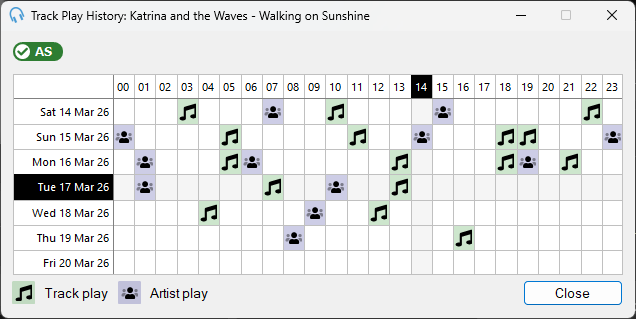
Purchasing the Advanced Scheduling module unlocks the full play history across days and hours. Without the module, only the most recent play is shown.
The Track Play History window provides a visual representation of when and how often a track and its artist are played over a selected time period. This supports in-depth analysis and informed decisions in music scheduling.
Accessing Track Play History
To view the Track Play History for a specific track:
- From the main window, on a playout log item, select the three dots (or right-click) and select Track Play History...
- From the main window, on the track list, right-click a track and select Track Play History...
Reading the Grid
The window displays a grid where:
- Rows represent days.
- Columns represent hours of the day, from 00 to 23.
- A green music note icon indicates the track was played during the corresponding hour and day.
- A blue person icon indicates the artist of that track was played during the corresponding hour and day.
For times in the future, the icons indicate the track or artist is scheduled for that hour.
Practical Uses
Track Play Frequency: Instantly see how often a track is played, helping to avoid overplay or underplay of particular songs or artists.
Play Pattern Analysis: Identify patterns in track plays to optimise music rotation and scheduling.
Artist Exposure: Monitor how frequently songs from a particular artist are played, helping to maintain a diverse playlist.