Insert Track Action
Use the Insert Track action to insert a track into the log at a specific position. Select from a Track from the Track List, a Track Group, or a File from the file system.
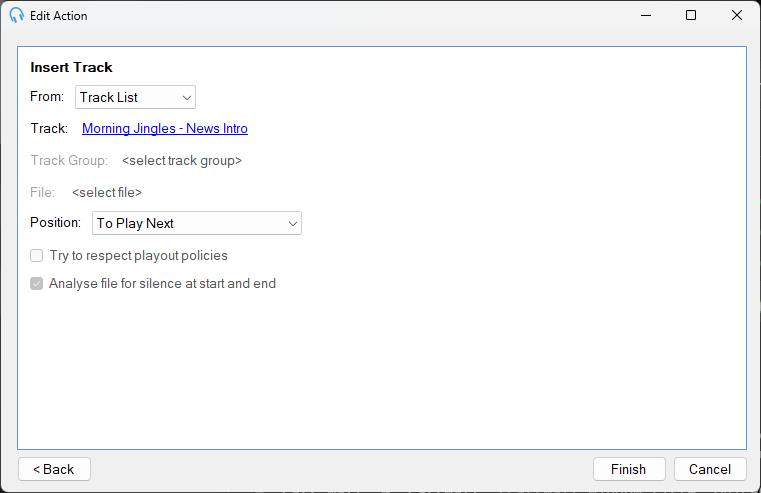
Insert From

Choose the source for the track to insert:
- Track: select a specific track from the Track List.
- Track Group: select a Track Group and PlayIt Live will pick a track from it.
- File: browse to an audio file on the file system.
Track

The track to insert when Track mode is selected. Click the link to open the track selection window and choose a track.
Track Group

The Track Group to select from when Track Group mode is selected. Click the link to open the Track Group selection window.
File

The audio file to insert when File mode is selected. Click the link to browse for the file.
Position

Where to insert the track in the log:
- To Play Next: after the currently playing track.
- End Of Current Hour: at the end of the current clock hour.
- Start Of Next Hour: at the start of the next clock hour.
- End Of Next Hour: at the end of the next clock hour.
Try to Respect Playout Policies

When Track Group mode is selected, tick this option to make PlayIt Live try to insert a track from the group that does not violate the current playout policies. If no qualifying track can be found, a track is chosen at random from the group.
This option only applies when inserting from a Track Group.
Analyse Silence

When File mode is selected, tick this option to automatically analyse the file for silence at the start and end of the track before inserting it.
This option only applies when inserting from a File.