Named Inputs
Named Inputs are commands that PlayIt Live receives from your external devices. Each input represents a specific signal or event from your hardware, such as a button press, sensor activation, or status change.
When you create a Named Input, you specify:
- Hardware - Which configured hardware device will send the command.
- Input Name - A descriptive name displayed in PlayIt Live (e.g. "Next Track Button").
- Input ID - A unique identifier used for API access and logging (e.g. "BTN_NEXT").
- Command - The exact text string that must be received from the device to trigger this input (e.g.
PLAY_NEXT\r\n).
When PlayIt Live receives data from the hardware that matches the specified command string, the corresponding Named Input is triggered. This trigger can then execute actions through Input Triggers.
Configuring Named Inputs
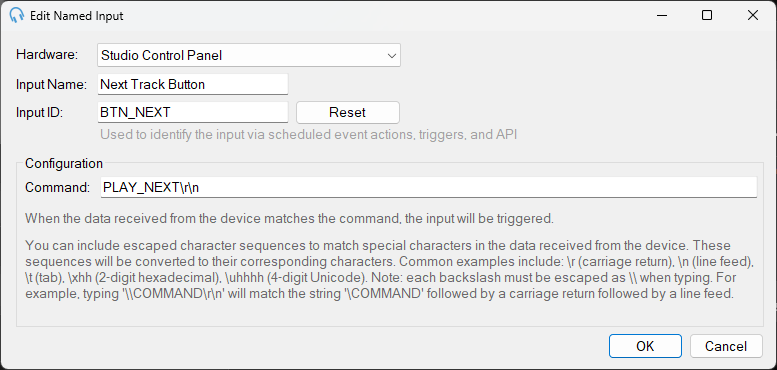
When you click Add New or Edit in the Named Inputs section, you configure the following settings:
Hardware
Select which configured hardware device will send this input command. The dropdown lists all hardware devices you have configured in the Hardware section. You must configure at least one hardware device before you can create Named Inputs.
Input Name
A descriptive, human-readable name for this input that appears throughout PlayIt Live's interface. This name is displayed when creating Input Triggers and helps you identify the purpose of each input.
Input ID
A unique identifier used to reference this input in scheduled event actions, triggers, and API calls. Must be unique across all Named Inputs. Click Reset to automatically generate a unique ID based on the Input Name you entered.
If you change the Input ID after it is already being used, any existing scheduled events or playout log items referencing the old Input ID will no longer work and must be manually updated. Only change the Input ID if absolutely necessary.
Configuration - Command
The Command field contains the exact text string that must be received from the hardware device to trigger this input. When PlayIt Live receives data from the device that matches this command string, the corresponding Named Input is triggered.
When your external device (Arduino, control panel, etc.) sends data to PlayIt Live, that data is compared against all configured Named Input commands. If a match is found, the input is triggered and any associated Input Triggers are executed.
You can include special character sequences to match non-printable characters in the received data:
| Sequence | Character |
|---|---|
\r | Carriage return (CR) |
\n | Line feed (LF) |
\t | Tab character |
\\ | Literal backslash |
\xhh | 2-digit hexadecimal byte (e.g. \x0D) |
\uhhhh | 4-digit Unicode character |
Each backslash must be escaped as \\ when typing. For example, to match the string \COMMAND followed by a carriage return and line feed, type: \\COMMAND\r\n
Command Matching
The command must match exactly for the input to trigger. Pay careful attention to:
- Letter case (most systems are case-sensitive)
- Line endings (
\r\nvs\nvs none) - Whitespace characters
- Any special characters or escape sequences