Advert Play Report
Some images on this page may not display correctly if you have an ad blocker installed. Disable your ad blocker on this site to see all images.
The Advert Play Report window generates a report showing the times that adverts were played. You can give this report to customers as proof of plays.
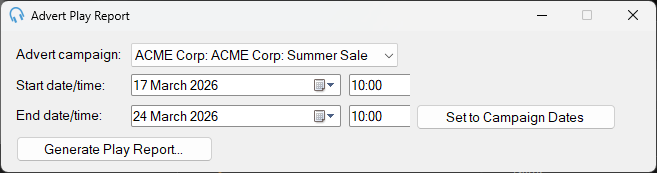
1
Advert Campaign

Select the advert campaign to generate a play report for.
2
Date range

Use the start and end date selectors to set the date range for the report.
3
Set to Campaign Dates

Click Set to Campaign Dates to automatically set the start and end dates to the campaign's scheduled start and end dates.
4
Generate Play Report...

Click Generate Play Report... to generate the report. You will be prompted to choose a location to save the file. The report is saved as a CSV file, which can be opened in Microsoft Excel or Google Sheets.