Manage Track Groups Window
The Manage Track Groups window lists all the track groups in the system. Open it from the Manage > Track Groups menu.
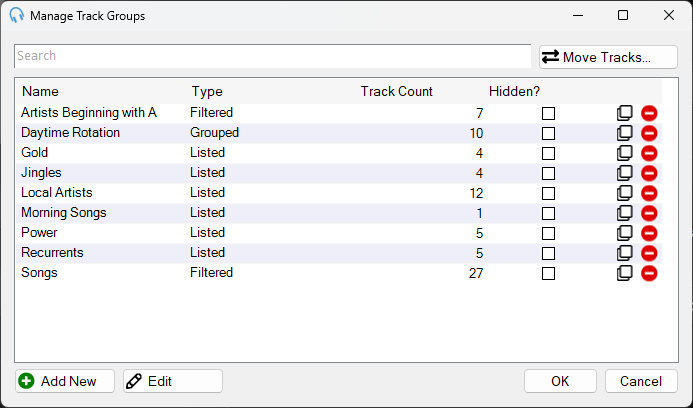
The Manage Track Groups window showing a list of track groups with their types and track counts.
Search Box

Use the search box to find a track group by name.
Track Group List

Displays the Name, Type, Track Count, and Hidden state of each track group. Double-click an entry in the list to begin editing. Depending on the type, this will open the Edit Listed Track Group, Edit Filtered Track Group, or Edit Grouped Track Group window.
Each row also includes:
- Hidden checkbox. Check it to hide the track group from the main interface track group selector.
- Clone icon. Click it to make a copy of the track group.
- Delete icon. Click it to delete the track group from the system.
Add New

Click Add New to begin adding a new track group. This opens the Choose Track Group Type window.
Edit
Click Edit to begin editing the selected track group. Depending on the type, this will open the Edit Listed Track Group, Edit Filtered Track Group, or Edit Grouped Track Group window.
OK

Click OK to save changes and close the window.
Cancel

Click Cancel to discard changes and close the window.
Move Tracks
Use the Move Tracks feature to easily move tracks between existing Listed Track Groups. See Move Tracks Window.