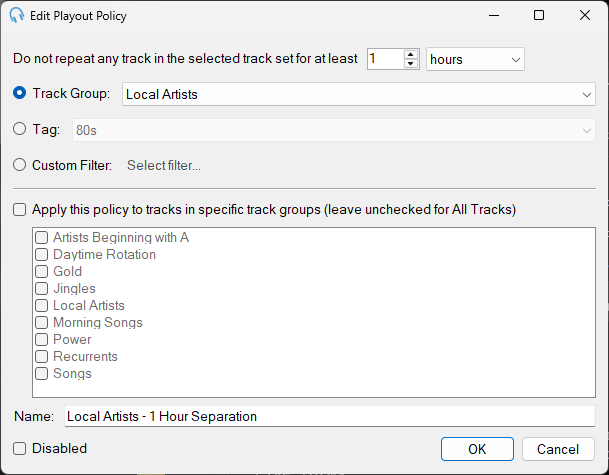
Edit Track Set Separation Playout Policy Window
Track Set Separation Playout Policies ensure that any track in the same set (track group, tag, or filter) is not played again for a specified period of time. This policy is useful for ensuring variety within specific categories of content.
Track Set Separation requires the Advanced Scheduling module. Start a free two-week trial from within PlayIt Live via Help > Licensing Information.
Separation Time

Use the up and down arrows to change the minimum number of hours or minutes that should pass before any track in the selected set is played again. Use the dropdown to change the time unit.
Set Type and Selection

Choose how to define the track set for this policy:
- Track Group: Select a track group to use all the tracks within that group as the set.
- Tag: Select a tag to use all tracks that have been tagged with the selected tag.
- Custom Filter: Click Select filter... to choose a custom filter. The filter interface is the same as creating a Filtered Track Group.
Specific Track Groups
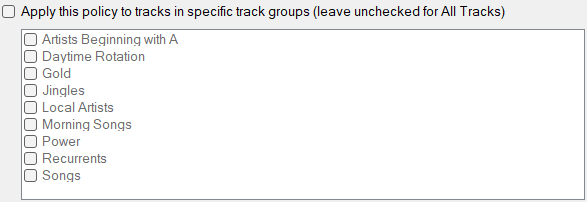
Check the checkbox to ensure this playout policy is only applied to tracks in the selected track groups. Leave the checkbox unchecked to apply the policy to all tracks regardless of track group.
Name

The name of the playout policy. Choose a descriptive name that clearly indicates what the policy does.
Disabled

Disable a playout policy so it is not considered by the scheduler.
OK

Click OK to confirm changes to the playout policy.
Cancel

Click Cancel to discard changes.