Track Play Count Analysis
Track Play Count Analysis can be used to determine the number of plays tracks have had during a date/time range. This can be useful to ensure you have the desired balance of tracks or if you are producing an air play chart show.
To open Track Play Count Analysis, go to Tools > Track Play Count Analysis.
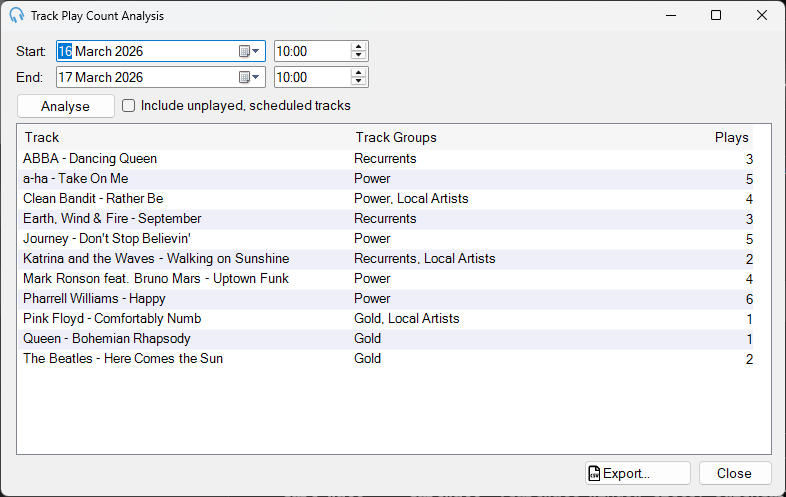
Date Range

Select a start and end date to analyze the number of plays between.
Analyze and Include Unplayed

Click Analyze to start the analysis of previous playout logs to determine the number of plays for each track. Check Include unplayed, scheduled tracks to also include tracks that were scheduled but did not play, for example because they were dropped by a fixed time marker. This option will also include all tracks scheduled in a future date range.
Results
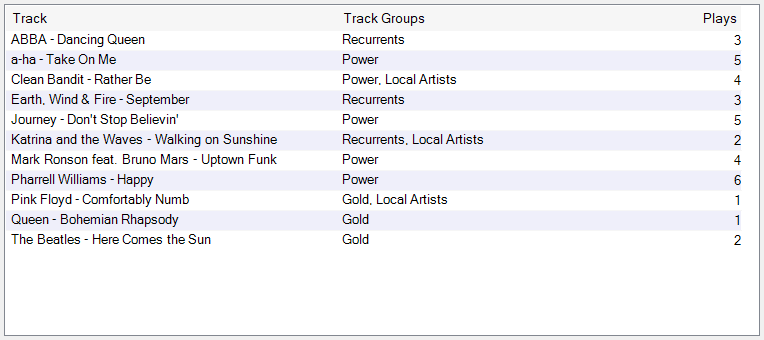
Once the analysis is complete, the results will be displayed. The track will be shown along with the track group it is in and the number of plays it has had during the time range. You can sort by Track, Track Groups, or Plays.
Export to CSV
Click Export... to save the results to a CSV file, which can be opened in Microsoft Excel or Google Sheets for further analysis.
Close

Click Close to close the Track Play Count Analysis window.