Edit Daypart Window
A daypart defines a period of time during the week, typically a regular listening period for a target listener, such as Breakfast or Drive. Dayparts are used by Daypart Separation Playout Policies to prevent the same track from being played during a daypart for a period of days.
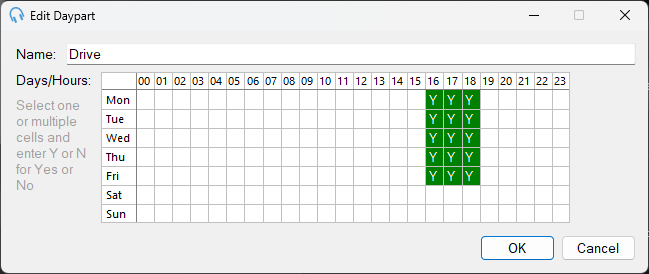
Name

The name of the daypart.
Days/Hours
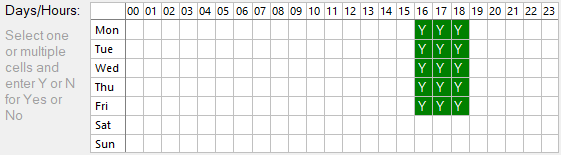
The Days/Hours section shows which hours on which days apply to the daypart. In this example, Drive is defined as the 4pm, 5pm, and 6pm hours, Monday to Friday.
To change whether an hour is assigned to the daypart, click the cell and type Y or N for Yes or No and press Enter. To change every day for a specific hour, click the column heading and type Y or N. To change every hour for a specific day, click the row heading and type Y or N. You can also drag to select a range of hours and type Y or N.
With a range selected, you can press Delete to clear the selected cells.
Blank cells represent "No" entries.
OK

Click OK to save changes.
Cancel

Click Cancel to discard changes.