Input Triggers
Input Triggers define what PlayIt Live should do when a Named Input is received from your external hardware. They connect incoming hardware signals to PlayIt Live automation actions, enabling physical controls and external systems to trigger specific behaviors in the software.
When your external hardware sends a command that matches a Named Input, the corresponding Input Trigger is activated and executes its configured actions. Input Triggers can perform single actions or sequences of multiple actions.
Configuring Input Triggers
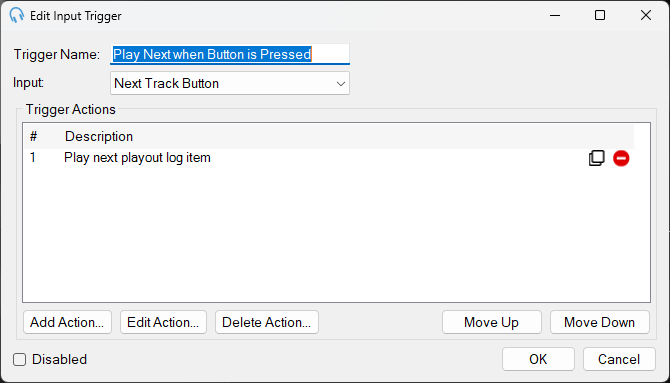
Click Add New or Edit in the Input Triggers section to configure a trigger.
Trigger Name
A descriptive name that explains what this trigger does. This helps you identify the trigger's purpose when managing multiple triggers.
Input
Select which Named Input will activate this trigger. The dropdown shows all Named Inputs you have configured. When the selected input receives its matching command from the hardware, this trigger executes.
Trigger Actions
The list of actions that will be executed sequentially when this trigger is activated. Actions are numbered and executed in order from top to bottom.
The actions available are the same as those that can be configured on scheduled events. This means any action you can schedule to occur at a specific time can also be triggered by external hardware inputs.
Click Add Action... to add an action to the list.
Disabled
Check this box to temporarily disable the trigger without deleting its configuration. While disabled, the trigger will not execute even when its associated Named Input is received. This is useful for testing or temporarily suspending automation without losing your configuration.