Loudness Analysis
With Loudness Analysis you can analyze your tracks, calculate an offset gain and store it for each track in your database. When a track is played by PlayIt Live, this gain is applied so that every track plays back at the same loudness.
The ITU-R BS.1770 algorithm is used to measure loudness. This is commonly known as LUFS normalisation.
Loudness Analysis is found under the Tools section.
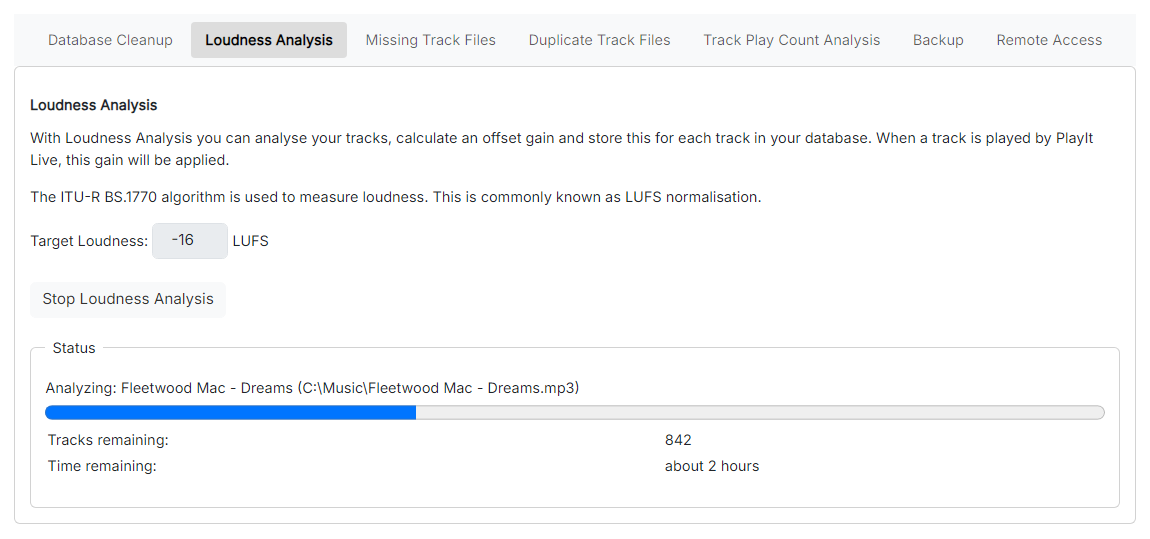
The Loudness Analysis page.
Target Loudness

The loudness, in LUFS, that each track is adjusted towards. The default is -16 LUFS.
Start Loudness Analysis
Start analyzing your tracks. While analysis is running, this button stops it.
Status

Shows the current status of the analysis, including progress and the number of tracks remaining once it is running.
PlayIt Manager runs Loudness Analysis in the background as it processes each track. Because the algorithm is complex, it can take several hours to process all of your tracks, but this only needs to be done once. Leave PlayIt Manager running so it can process the tracks in the background. Any new tracks you add are processed automatically.