Advanced Settings
If you find these settings are disabled, you must first stop the server by clicking the Stop Server button in the top section.
Note: Ensure you have licensed PlayIt Manager via the web interface. This is required to enable a hostname for the Hostname registration section.
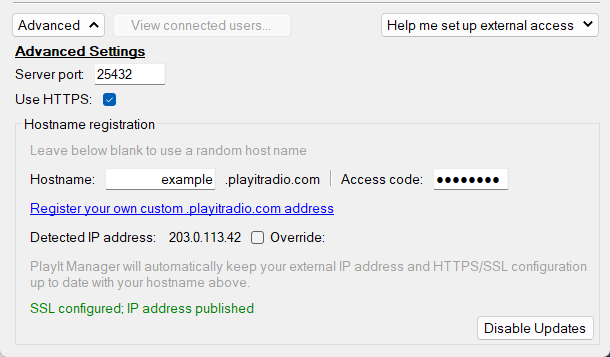
Server port

The port used by the remote access server. By default, this is 25432. This should not need to be changed unless you require a specific port number.
Use HTTPS

With HTTPS, data between you and the connecting user will be encrypted. Without it, a "Not Secure" message will be shown in the web browser. Due to browser restrictions, HTTPS is required to use Remote Voice Tracking and Remote Studio in the web browser.
Technical detail: When HTTPS is enabled, an SSL certificate for the registered hostname will be generated for you by PlayIt Software and installed on your machine. A self-signed certificate will also be generated for localhost to be used on the local computer.
Hostname
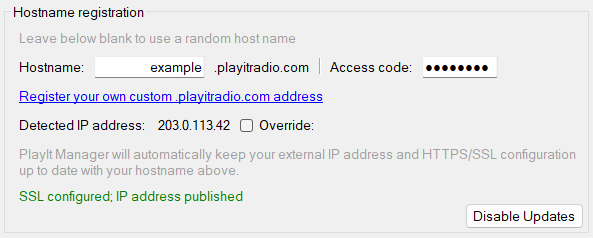
The hostname used to allow other users to access your remote access server with a static (and potentially memorable) address. Leave the hostname and access code boxes blank before starting the server to use a random address. You can register your own custom address using the link. Once you have registered the hostname, enter the hostname and access code provided to you into the corresponding boxes.
Custom hostnames are only available to customers who have an active premium module subscription or lifetime purchase.
Detected IP address

Shows the detected external IP address. This address is used to automatically map your hostname to your IP. If your IP changes, your hostname remains the same. If you wish to override the detected IP address, click Override, enter the IP address, and click Save.
Status

Shows the status of the SSL certificate registration and IP address publishing. Typically SSL certificate registration and IP address (DNS) registration takes around 10 minutes after starting the server.
Disable Updates

PlayIt Manager normally keeps your hostname's IP address and SSL certificate registration up to date automatically. Click Disable Updates to turn this off and manage the registration yourself; the button then reads Enable Updates so you can switch automatic updates back on. While updates are disabled, your hostname may stop resolving if your external IP address changes.
See also Setting Up External Access.