Remote Access
The Remote Access page shows the sessions that are currently connected to your PlayIt Manager server, so you can see who is using it at any moment and disconnect a session if you need to.
A session appears here when someone is connected through the Remote Management web application or through Remote Voice Tracking. The list refreshes automatically every few seconds, so sessions appear and disappear as people connect and leave.
Note: Remote Studio sessions do not appear here. Remote Studio connects directly to the on-air PlayIt Live instance rather than to PlayIt Manager, so PlayIt Manager does not see those connections.
Remote Access is found under the Tools section. To open it, go to Tools > Remote Access. You need the Manage Remote Access permission to see it.
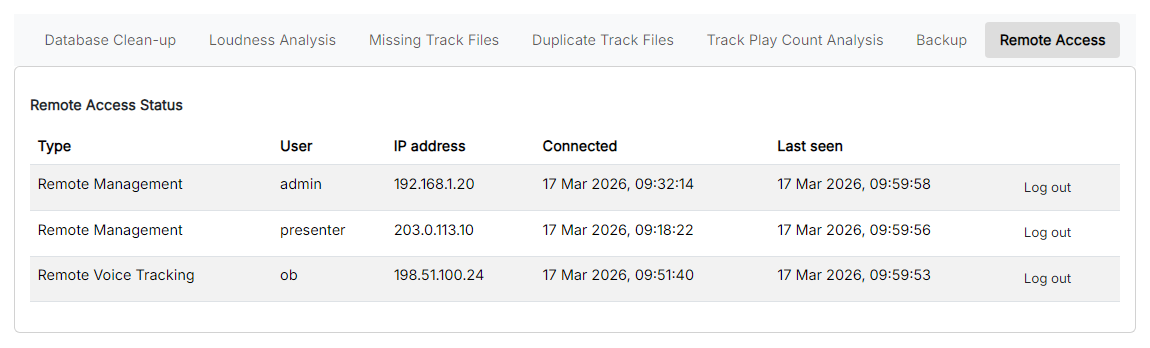
The Remote Access page listing the currently connected sessions.
Type

The type of session, which tells you how the user is connected:
- Remote Management: someone signed in to the PlayIt Manager web application.
- Remote Voice Tracking: a user recording voice tracks remotely.
User
The user the session is signed in as. If no user name is available a dash is shown.
IP address
The network address the session is connecting from. An address on your local network (such as 192.168.x.x) indicates a connection from inside your station; any other address is a connection from outside.
Connected

The date and time the session first connected.
Last seen

The date and time the session was last active. Because the list refreshes automatically, a live session shows a Last seen time only a few seconds old.
Log out

Disconnects that session. You are asked to confirm first. The user is signed out and, after the next refresh, the row disappears from the list. The user can connect again unless you also remove or disable their account in User Management.
When no one is connected, the page shows a message in place of the table rather than an empty list.