Web Links Settings
The Web Links tab of the Settings window configures custom web links that appear on the right-click context menu of tracks. Web Links can be used to quickly search the web for an artist or track by right-clicking a track in the track list or in the segue editor.
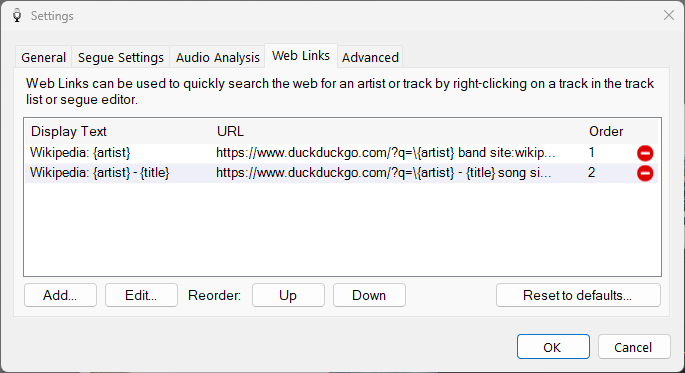
The Web Links tab of the Settings window.
1
Web Links list
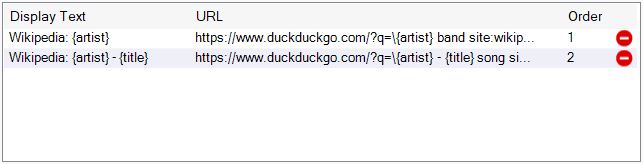
The list of configured web links:
- Display Text - The text displayed on the right-click context menu, e.g.
Wikipedia: {artist}would displayWikipedia: ABBA. The{artist}placeholder can be used here so the menu entry reflects the current track. - URL - The URL (web address) opened in the browser. Placeholders for
{artist},{title}and{album}can be used and are automatically replaced with the current track's artist, title and album. - Order - The order in which the links appear on the context menu. This can be changed using the Up/Down buttons.
2
Actions

Use the buttons to manage your web links:
- Add... - Add a new web link.
- Edit... - Edit the selected web link.
- Up / Down - Reorder the selected link.
- Reset to defaults... - Clear all existing web links and start again with the defaults.
Examples
| Display Text | URL | Comments |
|---|---|---|
| Wikipedia: {artist} | https://www.duckduckgo.com/?q=\{artist} band site:wikipedia.org | Uses DuckDuckGo to find the first result matching the search. The backslash \ denotes this. |
| Wikipedia: {artist} - {title} | https://www.duckduckgo.com/?q=\{artist} - {title} song site:wikipedia.org | Uses DuckDuckGo to find the first result matching the search. The backslash \ denotes this. |
| Google: {artist} - {title} | https://www.google.com/search?q={artist} - {title} | |
| Wikipedia: {artist} | https://en.wikipedia.org/w/index.php?search={artist} | Directly search Wikipedia. |
| All Music: {artist} | https://www.allmusic.com/search/all/{artist} | |
| Discogs: {artist} - {title} | https://www.discogs.com/search/?q={artist} - {title}&type=release | |
| MusicBrainz: {artist} | https://musicbrainz.org/search?type=artist&query={artist} |