Settings
The Settings window configures audio devices, default project values, recordings folder, language and other application-wide preferences for PlayIt VoiceTrack.
Open the Settings window from the main window by selecting File > Settings... from the menu.
The Settings window is divided into tabs. This page covers the General tab, which contains the most commonly used settings. The remaining tabs are documented on their own pages:
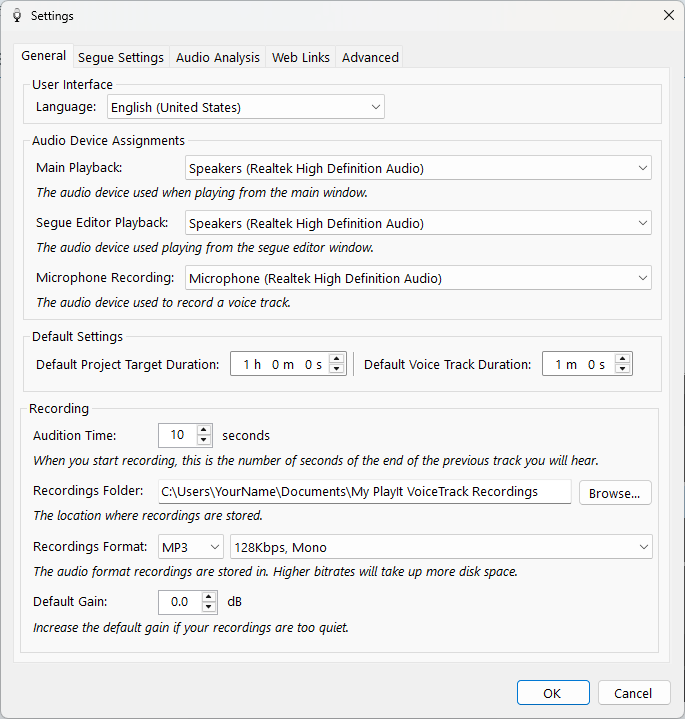
The General tab of the Settings window.
Section Tabs

The tab strip at the top of the Settings window allows you to switch between the different settings sections.
Language

Select the display language for PlayIt VoiceTrack. Changes take effect after restarting the application.
Main Playback device

The playback audio device used when playing audio from the main window.
Segue Editor Playback device

The playback audio device used when playing audio from the segue editor window.
Microphone Recording device

The recording device used when recording a voice track from the segue editor window. The device chosen here should not record audio that is played back, to avoid music being captured in the voice track recording.
Default Project Target Duration

When you create a new project, this is the target duration that is set for the project by default.
Default Voice Track Duration

When you insert a voice track, this is the initial duration that is set for the placeholder.
Audition Time

When you start recording, this is the number of seconds from the end of the previous track you will hear.
Recordings Folder

The location where the voice track recordings are stored on disk. Click Browse... to choose a different folder.
Recordings Format

The audio format of voice track recordings. High bit rates produce higher quality recordings but take up more space on disk.
Default Gain

When a voice track is recorded use this volume gain by default. This can be used if your microphone level is consistently too quiet without gain.
OK button

Save the settings and close the Settings window.
Cancel button

Discard the changes and close the Settings window.